
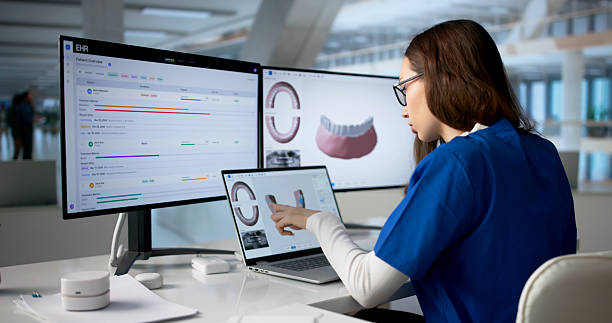
Managing a modern dental practice involves much more than treating teeth.
A dental clinic must schedule appointments, maintain patient records, track treatment plans, manage payments, communicate with patients, organize clinical documentation, monitor follow-ups, and keep staff coordinated. When these activities are handled through paper files, spreadsheets, phone calls, and disconnected applications, small administrative problems can quickly become expensive operational problems.
This is where dental patient management software can make a major difference.
A well-designed system brings important patient and practice information into a centralized digital environment. Instead of searching through filing cabinets for a patient’s history or manually calling every patient to confirm appointments, dental teams can use software to organize workflows and automate repetitive tasks.
However, choosing dental practice management software should not be based simply on how many features appear in a vendor’s sales presentation.
The right system needs to fit the way a dental practice actually works.
It should make it easier for staff to manage patients, help clinicians access relevant information, improve communication, support accurate billing, protect sensitive patient information, and provide useful information for practice management.
This guide explains what dental patient management software is, its essential features, benefits, costs, implementation strategies, common mistakes, and the questions dental practices should ask before choosing a solution.
Important: Software capabilities, pricing, privacy requirements, and integration options vary by provider and location. Dental practices should evaluate products according to their professional, legal, regulatory, privacy, security, and operational requirements.
What Is Dental Patient Management Software?
Dental patient management software is a digital platform designed to help dental practices manage patient information and the administrative and clinical workflows surrounding dental care.
Depending on the software, it may support:
- Patient registration
- Digital patient records
- Appointment scheduling
- Treatment planning
- Dental charting
- Billing
- Payment tracking
- Insurance information
- Appointment reminders
- Patient communication
- Clinical notes
- Prescription management
- Document management
- Recall scheduling
- Staff management
- Reporting and analytics
Some platforms focus primarily on patient administration, while broader dental practice management software can connect clinical, financial, and operational processes.
The goal is not merely to digitize paperwork.
The greater opportunity is to create a connected workflow.
Why Dental Practices Need Patient Management Software
Consider what happens when a patient books a dental appointment.
The practice may need to:
- Record the patient’s information.
- Schedule the appointment.
- Confirm the appointment.
- Prepare the patient’s record.
- Document the examination.
- Create a treatment plan.
- Explain treatment and costs.
- Generate an invoice.
- Record payment.
- Schedule follow-up treatment.
- Send future reminders.
When these activities happen manually, staff may spend significant time moving information from one place to another.
That creates opportunities for:
- Duplicate data entry
- Lost information
- Appointment errors
- Delayed follow-ups
- Billing mistakes
- Poor communication
- Inconsistent documentation
Dental patient management software can connect many of these processes.
Key Features of Dental Patient Management Software
Not every practice needs every feature. However, several capabilities are particularly valuable.
1. Digital Patient Records
A centralized patient record can contain information such as:
- Contact details
- Medical history
- Dental history
- Allergies
- Treatment history
- Clinical notes
- Treatment plans
- Appointments
- Billing records
- Documents
Having relevant information available electronically can reduce the need to search through physical files.
However, practices should configure access carefully because dental records contain sensitive information.
2. Appointment Scheduling
Appointment management is one of the most important features.
A good scheduling system should allow staff to see:
- Available appointment times
- Dentist availability
- Operatory availability
- Appointment type
- Patient details
- Cancellations
- Rescheduled appointments
- Upcoming appointments
Some platforms also allow patients to request or book appointments online.
3. Automated Appointment Reminders
No-shows can create significant operational problems for dental practices.
Appointment reminder software can send messages through supported channels such as:
- SMS
- Patient portals
- Other integrated communication services
For example, a clinic could configure reminders for:
7 days before → 24 hours before → appointment day
The exact schedule should reflect the practice’s patient population and communication preferences.
Automation does not eliminate no-shows, but it can reduce the administrative burden associated with appointment confirmation.
4. Dental Charting
Dental charting is different from ordinary patient record management.
Dental software may provide visual representations of teeth and allow clinicians to document relevant findings and procedures.
Depending on the system, charting may include:
- Existing conditions
- Missing teeth
- Restorations
- Planned procedures
- Completed procedures
- Periodontal information
- Tooth-specific notes
A digital dental chart can make treatment history easier to review.
5. Treatment Planning
Treatment planning allows dental professionals to organize recommended procedures for a patient.
For example:
| Treatment | Status | Priority |
|---|---|---|
| Dental examination | Completed | Routine |
| Filling | Planned | Medium |
| Crown | Recommended | High |
| Cleaning | Scheduled | Routine |
The system may also connect treatment plans with estimates, appointments, and billing workflows.
This can help staff understand what has been recommended, what has been completed, and what still needs attention.
6. Billing and Payment Management
Dental billing can become complicated when practices manage:
- Multiple procedures
- Deposits
- Outstanding balances
- Insurance claims
- Payment plans
- Refunds
- Discounts
Dental billing software can help centralize these activities.
Useful capabilities may include:
- Automatic invoice generation
- Payment recording
- Outstanding balance tracking
- Receipts
- Financial reports
- Insurance information
- Payment-plan management
Practices should carefully verify how a vendor handles local billing and insurance requirements.
7. Patient Communication
Patient communication can become easier when it is connected to the practice management system.
For example, a clinic could send:
- Appointment confirmations
- Reminders
- Follow-up notifications
- Recall messages
- Payment notifications
- General practice communications
Communication templates can reduce repetitive work for reception staff.
However, messages should be designed with privacy in mind and should not unnecessarily reveal sensitive health information.
8. Recall and Follow-Up Management
One of the most valuable but overlooked features of dental management software is recall management.
A patient may need another appointment months after their current visit.
Without a structured recall system, patients can easily disappear from the practice’s follow-up process.
Software can help create reminders based on the practice’s defined workflow.
For example:
Patient completes routine visit → recall date recorded → reminder scheduled → patient contacted → appointment booked
This can improve continuity while reducing manual tracking.
9. Document Management
Dental practices generate documents such as:
- Consent forms
- Treatment plans
- Referral documents
- Insurance paperwork
- Clinical documentation
Digital document management can help organize these records and associate them with the appropriate patient.
10. Reporting and Analytics
Practice owners need to understand what is happening operationally.
Useful reports may include:
- New patients
- Returning patients
- Appointment volume
- Cancellation rates
- No-show rates
- Revenue
- Outstanding balances
- Treatment acceptance
- Recall performance
- Provider productivity
The most useful dashboards are those that help managers make decisions rather than simply display large amounts of data.
Dental Patient Management Software vs Dental Practice Management Software
These terms are sometimes used interchangeably, but there can be a distinction.
Dental patient management software may focus heavily on patient records, appointments, communication, and patient workflows.
Dental practice management software often covers a broader range of functions, including:
- Patient management
- Clinical charting
- Scheduling
- Billing
- Insurance
- Reporting
- Staff management
- Practice administration
The distinction varies between vendors.
Therefore, practices should evaluate the actual features rather than relying solely on the product’s name.
Dental Patient Management Software: Essential Features at a Glance
| Feature | Why It Matters | Priority |
|---|---|---|
| Digital patient records | Centralizes patient information | Essential |
| Appointment scheduling | Organizes clinic workflow | Essential |
| Dental charting | Supports tooth-specific documentation | Essential |
| Treatment planning | Tracks recommended and completed care | Essential |
| Billing | Manages charges and payments | Essential |
| Patient reminders | Helps manage appointments | High |
| Recall management | Supports long-term follow-up | High |
| Reporting | Helps management make decisions | High |
| Patient portal | Improves patient self-service | Medium–High |
| Online booking | Makes appointment requests easier | Medium–High |
| Inventory management | Tracks dental supplies | Medium |
| Multi-location management | Useful for dental groups | High for larger organizations |
| Imaging integration | Connects relevant imaging workflows | Depends on practice |
The Biggest Benefits of Dental Patient Management Software
Better Organization
Instead of keeping information across multiple locations, staff can work from a centralized system.
Reduced Administrative Work
Automation can reduce repetitive activities such as appointment confirmations and recall tracking.
Better Patient Experience
Patients may benefit from easier scheduling, faster communication, and more organized visits.
Improved Billing Visibility
Staff can more easily identify unpaid balances and track payments.
Better Treatment Coordination
Dentists and staff can see treatment plans and appointment history more systematically.
Improved Practice Reporting
Owners can make decisions using actual practice data rather than assumptions.
A Real-Life Example
Imagine a dental clinic with two dentists and three reception staff.
Before adopting patient management software, the practice uses:
- Paper patient folders
- A shared calendar
- Spreadsheets for payments
- Phone calls for reminders
A patient completes a consultation and is advised to return for additional treatment.
The dentist writes the recommendation in the patient’s file.
The receptionist must remember to contact the patient later.
Sometimes the follow-up happens.
Sometimes it does not.
After implementing a centralized dental management system, the workflow can become:
Treatment plan created → follow-up requirement recorded → recall task generated → reminder sent → appointment scheduled → treatment completed → record updated
The software has not replaced the dental team.
Instead, it has made it harder for an important task to be forgotten.
That distinction is one of the most valuable ways to think about healthcare automation.
How Much Does Dental Patient Management Software Cost?
There is no single price that applies to every dental practice.
Pricing may depend on:
- Number of dentists
- Number of staff users
- Number of locations
- Number of patients
- Features
- Cloud vs on-premises deployment
- Data migration
- Training
- Support
- Integrations
- Customization
- Imaging requirements
A small dental practice may use a subscription-based platform with a relatively simple pricing structure.
A large dental organization may require an enterprise dental management system with multiple locations, advanced integrations, and customized workflows.
Understanding the True Cost
The advertised software license is not necessarily the total cost.
A practice should consider:
| Cost Category | What to Investigate |
|---|---|
| Software | Subscription or license |
| Implementation | Setup and configuration fees |
| Data migration | Cost of importing existing patient records |
| Training | Initial and ongoing training |
| Support | Included or additional? |
| Integrations | EHR, imaging, payment, accounting, etc. |
| Hardware | Computers, scanners, network equipment |
| Storage | Especially important for imaging-heavy environments |
| Customization | Cost of changing workflows |
| Maintenance | Annual or recurring charges |
| Upgrades | Included or separately billed? |
| Exit costs | Data export and migration if switching vendors |
A cheaper system may become expensive if it requires extensive manual work or costly customization.
Cloud-Based Dental Software vs On-Premises Software
Many modern dental practices consider cloud-based platforms.
Cloud-based software
The vendor or cloud provider hosts the application and infrastructure.
Potential advantages include:
- Easier remote access
- Reduced local infrastructure requirements
- Centralized updates
- Scalability
Potential considerations include:
- Internet dependency
- Vendor security practices
- Data location
- Subscription costs
- Connectivity reliability
On-premises software
The practice or organization manages the local infrastructure.
Potential advantages include:
- Greater direct control
- Local infrastructure management
Potential challenges include:
- Hardware costs
- Maintenance
- Backup responsibilities
- IT requirements
- Disaster recovery planning
The right model depends on the practice’s circumstances.
Security and Privacy Should Be a Buying Priority
Dental patient management systems contain sensitive personal and health information.
Therefore, security should never be treated as a secondary feature.
Ask potential vendors about:
Access Control
Can administrators determine what each user can access?
Authentication
Does the platform support strong authentication mechanisms?
Encryption
How is data protected during transmission and storage?
Audit Logs
Can the practice determine who accessed or changed information?
Backups
How frequently is data backed up?
Disaster Recovery
What happens if the primary system becomes unavailable?
Data Export
Can the practice retrieve its information in a usable format if it changes vendors?
These questions are often more important than cosmetic features.
Integration With Dental Imaging
Some dental practices use digital imaging systems for:
- Intraoral X-rays
- Panoramic imaging
- Cephalometric imaging
- CBCT
- Other compatible imaging technologies
If imaging is important to your practice, ask whether the dental management platform can integrate with the relevant imaging systems.
Interoperability can prevent staff from repeatedly entering patient information into separate applications.
Depending on the systems involved, standards such as DICOM may be relevant.
How to Choose the Best Dental Patient Management Software
There is no universally “best” platform.
The best software is the one that fits your practice.
Start by identifying your biggest problems.
For example:
Problem: Too Many No-Shows
Prioritize:
- Automated reminders
- Online confirmations
- Cancellation management
- Recall workflows
Problem: Billing Delays
Prioritize:
- Integrated billing
- Payment tracking
- Insurance workflows
- Financial reporting
Problem: Poor Treatment Follow-Up
Prioritize:
- Treatment planning
- Recall management
- Automated follow-up
Problem: Paper-Based Records
Prioritize:
- Digital patient records
- Document management
- Data migration
- Secure backups
Practical Implementation Strategy
Step 1: Map Your Current Workflow
Write down exactly what happens from:
Patient booking → arrival → consultation → treatment → payment → follow-up
Identify where staff:
- Enter information repeatedly
- Wait for another department
- Use paper
- Make phone calls
- Search for documents
These are potential automation opportunities.
Step 2: Prioritize the Biggest Bottleneck
Do not try to transform everything at once.
If appointment management is the biggest problem, start there.
If billing is the biggest problem, start there.
Step 3: Test the Software With Real Scenarios
During a product demonstration, don’t simply ask the vendor to show features.
Give them realistic scenarios.
For example:
“Show us how you would register a new patient, schedule a treatment appointment, create a treatment plan, generate an estimate, record payment, and schedule the patient’s recall.”
This gives you a much better understanding of how the system works in practice.
Questions to Ask Vendors Before Buying
Ask:
- Can we migrate our existing patient records?
- How much does migration cost?
- Can patients book appointments online?
- Can automated reminders be customized?
- Does the system support dental charting?
- Can treatment plans be linked to billing?
- Does it integrate with our imaging equipment?
- What reporting features are included?
- Can we control staff permissions?
- Does the system maintain audit logs?
- How frequently is data backed up?
- What happens if the system goes offline?
- Can we export our patient data?
- What support is included?
- What are the recurring costs?
- Are software upgrades included?
- Can the system support multiple branches?
- Can we add users without major additional costs?
- What happens if we terminate the contract?
- Can you provide references from similar dental practices?
Common Mistakes Dental Practices Make
Choosing Based Only on Price
Low upfront cost does not necessarily mean low total cost.
Buying Too Many Features
A small clinic may not need every enterprise feature.
Unused functionality can increase complexity and training requirements.
Ignoring Staff Feedback
Receptionists and dental assistants may interact with the software more frequently than the practice owner.
Their feedback is extremely valuable.
Skipping a Proper Data Migration Plan
Patient records should be migrated carefully and validated.
Neglecting Security
Convenience should never come at the expense of protecting patient information.
Automating Everything
Some patient interactions require empathy, explanation, and professional judgment.
Automation should support the dental team rather than remove appropriate human interaction.
The Future of Dental Patient Management
Dental software is increasingly becoming part of a broader connected healthcare environment.
Future-focused dental practices may connect:
Patient portal → Scheduling → Dental management system → Imaging → Billing → Communication → Reporting
The important trend is not simply adding more technology.
It is connecting information so that staff do not have to repeatedly move it manually.
A practice that successfully connects these workflows can potentially create a smoother experience for both employees and patients.
Frequently Asked Questions
1. What is dental patient management software?
Dental patient management software is a digital platform used to manage patient records, appointments, treatment information, communication, billing, and other workflows within a dental practice.
2. What is the difference between dental patient management software and dental practice management software?
Dental patient management software may focus primarily on patient-related workflows, while dental practice management software often provides a broader set of clinical, administrative, billing, scheduling, and reporting functions. The exact distinction varies between software providers.
3. How much does dental patient management software cost?
Pricing varies according to the vendor, number of users, features, locations, integrations, deployment model, training, and support requirements. Practices should evaluate the complete cost of ownership rather than comparing subscription prices alone.
4. Is cloud-based dental software safe?
Cloud-based software can incorporate strong security controls, but safety depends on the provider, system configuration, access controls, encryption, backup procedures, and organizational security practices. Dental practices should conduct appropriate vendor and security assessments.
5. Can dental software reduce no-shows?
Appointment reminders and confirmation workflows can help patients remember scheduled appointments and may reduce some avoidable missed appointments. Results vary between practices and patient populations.
6. Can dental patient management software integrate with imaging systems?
Some platforms can integrate with dental imaging systems. Compatibility depends on the specific products, imaging equipment, interfaces, and standards supported by each system.
7. What should a small dental clinic look for?
A small clinic should generally prioritize reliable patient records, scheduling, dental charting, treatment planning, billing, reminders, security, ease of use, customer support, and reasonable total cost. More advanced functionality can be added when the practice actually needs it.
Summary
Dental patient management software can transform the way a dental practice organizes its daily operations.
Instead of relying on paper files, disconnected calendars, spreadsheets, and manual reminders, dental teams can use an integrated digital system to manage patient information, appointments, treatment plans, billing, communication, recalls, and reporting.
But the best software is not necessarily the platform with the most features.
It is the one that solves the practice’s most important problems without creating unnecessary complexity.
Before purchasing, map your current workflow. Identify where staff lose time. Determine which processes create the most errors or delays. Then evaluate software against those specific problems.
Pay particular attention to patient data security, interoperability, dental charting, treatment planning, appointment management, billing, recall functionality, reporting, data migration, support, and total cost of ownership.
And don’t forget the people who will use the system every day.
A technically impressive platform that frustrates receptionists, dental assistants, dentists, or patients may ultimately deliver less value than a simpler system that everyone can use effectively.
The most successful dental practices use technology to make healthcare more organized—not less personal.
When implemented thoughtfully, dental patient management software can help practices spend less time managing paperwork and repetitive administrative tasks and more time delivering an efficient, professional patient experience.